Gini gan ceritanya

, heheh …pertama-tama siapkan perangkat yang dibutuhkan :
1. Modem 3G untuk koneksi internet.
2. Wifi Access Point (option) bila digunakan untuk banyak komputer/laptop. Bisa juga menggunakan metode Adhoc peer to peer (antar laptop).
Dalam hal ini saya akan menggunakan metode Adhoc (peer to peer) laptop dengan laptop :
Pastikan sudah terinstall driver modem 3G anda dan ter setting dengan benar. Buat koneksi peer to peer antar laptop dengan cara klik network connection -> kemudian lihat status koneksi modem 3G anda (pastikan sudah konek dengan benar). Baca selengkapnya
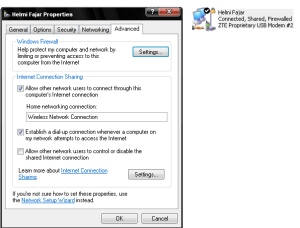
Network connection
Setting Adhoc
Langsung menuju Network Connection, klik kanan Wireless Network Connection -> Properties -> Pada tab General -> Internet Protocol (TCP/IP) -> Properties, kemudian set Ip Address dan subnet mask :
Ip Address : 192.168.0.1
Subnet Mask : 255.255.255.0
Klik ok, kemudian beralihlah ke Tab Wireless Network. Klik Add, kemudian tentukan nama SSIDnya, WEP key(opsional kalo mo dipakein password dll)
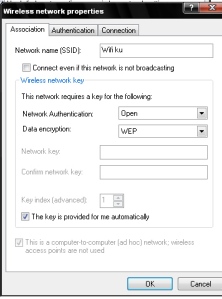
Gambar Adhoc
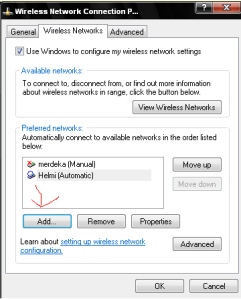
Adhoc2
selesai setting nama wifi nya, klik OK, trus akan balik ke windus Wireless Network. Klik Advanced, kemudian set ke Ad Hoc(Computer-computer )
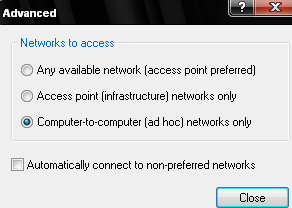
Adhoc3
Jika sudah, klik close, kemudian Ok untuk apply setting.
Setelah tahap setting laptop sebagai server sudah selesai

, tinggal setting di sisi client
Untuk client, masuk ke wireless network nya, terus setting IP.
Masukkan ip address dengan range class 192.168.0.x dengan subnet mask 255.255.255.0
default gateway nya diarahkan ke 192.168.0.1 (ip laptop pertama)
Kemudian tinggal koneksikan.
Ada beberapa tambahan setting untuk DNS dan juga WINS. Nilai nya bisa dilihat dengan mengetikkan ipconfig /all di laptop server. kurang lebih akan muncul tampilan sebagai berikut :
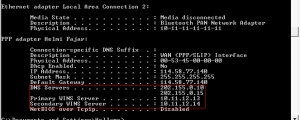
ipconfig
SELAMAT MENCOBA....!!!


 Pernyataan :


